
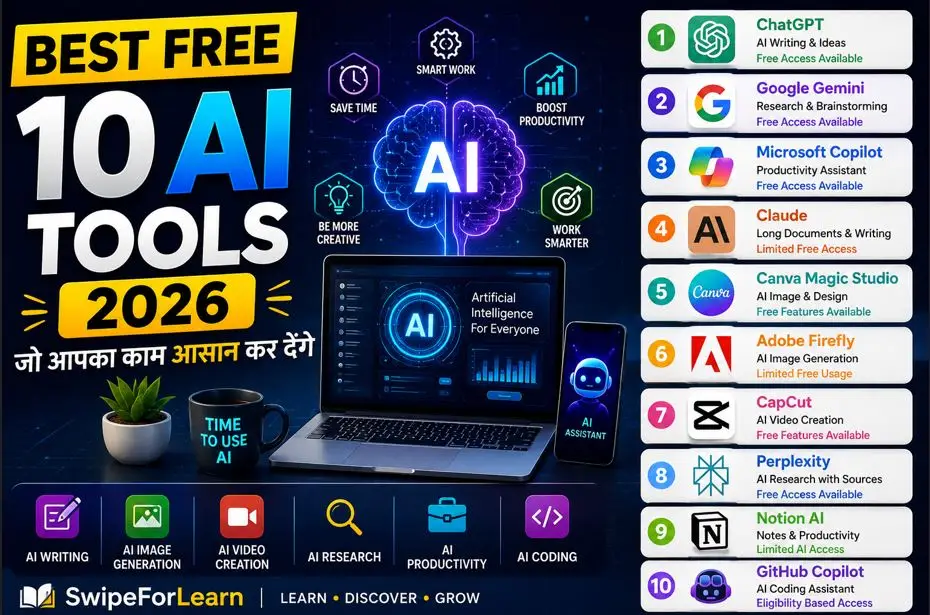
2026 के 10 Best Free AI Tools जो आपका काम आसान कर देंगे
Best Free AI Tools 2026
Artificial Intelligence यानी AI अब केवल बड़ी कंपनियों या तकनीकी experts तक सीमित नहीं है। 2026 में students, teachers, bloggers, content creators, freelancers, professionals और small business owners अपने रोज़मर्रा के काम को आसान बनाने के लिए AI tools का इस्तेमाल कर रहे हैं।
AI की मदद से writing, research, image creation, video editing, notes, planning और coding जैसे काम कम समय में किए जा सकते हैं। सबसे अच्छी बात यह है कि कई लोकप्रिय AI tools के free plans उपलब्ध हैं, जिनकी मदद से beginners भी AI का अनुभव ले सकते हैं।
इस लेख में हम 2026 के 10 Best Free AI Tools के बारे में जानेंगे। साथ ही यह भी समझेंगे कि कौन-सा tool किस काम के लिए उपयोगी है और beginners को किस AI tool से शुरुआत करनी चाहिए।
नोट: AI tools के free features, limits और availability समय के साथ बदल सकते हैं। इस्तेमाल करने से पहले संबंधित tool की official website पर latest जानकारी अवश्य check करें।
AI Tools क्या हैं और 2026 में इनकी जरूरत क्यों बढ़ रही है?
AI Tools ऐसे software और online applications हैं जो Artificial Intelligence की सहायता से विभिन्न कामों को आसान बनाने में मदद करते हैं।
इनकी मदद से आप:
- Content और articles लिख सकते हैं
- Ideas और outlines बना सकते हैं
- Research कर सकते हैं
- Images और designs बना सकते हैं
- Videos edit कर सकते हैं
- Notes और documents summarize कर सकते हैं
- Coding और debugging में सहायता ले सकते हैं
- Productivity और planning बेहतर बना सकते हैं
2026 में online education, remote work, digital marketing और creator economy के बढ़ने के कारण AI tools की जरूरत तेजी से बढ़ रही है।
हालांकि, AI से मिलने वाली जानकारी को सीधे सही मानकर इस्तेमाल नहीं करना चाहिए। महत्वपूर्ण facts को reliable sources से verify करना जरूरी है।
Best Free AI Tools 2026: Comparison Table
| AI Tool | Category | Best For | Free Availability |
|---|---|---|---|
| ChatGPT | AI Writing, Productivity | Writing और Ideas | Free access उपलब्ध |
| Google Gemini | Research, Writing | Research और Brainstorming | Free access उपलब्ध |
| Microsoft Copilot | Productivity | Work और Assistance | Free access उपलब्ध |
| Claude | Writing, Research | Long Documents | Limited free access |
| Canva Magic Studio | Image, Design | Social Media Graphics | Free features |
| Adobe Firefly | Image Generation | Creative Visuals | Limited free usage |
| CapCut | Video Creation | Short Videos | Free features |
| Perplexity | AI Research | Sources सहित Research | Free access |
| Notion AI | Productivity | Notes और Planning | Limited AI access |
| GitHub Copilot | Coding | Code Suggestions | Eligibility और limits के अनुसार |
1. ChatGPT: सबसे उपयोगी AI Writing Tool
यह क्या करता है?
ChatGPT एक लोकप्रिय AI assistant है जो questions के answers देने, writing, brainstorming, summaries, translations और creative ideas बनाने में मदद कर सकता है।
यह students से लेकर bloggers और professionals तक कई लोगों के लिए उपयोगी है।
मुख्य Features
- Writing और rewriting
- Brainstorming और content ideas
- Summaries
- Translation
- Study assistance
- Basic analysis support
- Email और outline creation
किसके लिए उपयोगी है?
- Students
- Bloggers
- Teachers
- Content creators
- Freelancers
- Marketers
- Small businesses
Free Version में क्या मिलता है?
Free access में उपलब्ध features और usage limits समय के साथ बदल सकते हैं। सामान्य tasks जैसे questions, writing और learning के लिए यह एक अच्छा शुरुआती AI tool हो सकता है।
कैसे उपयोग करें?
अपनी जरूरत को साफ language में लिखें।
उदाहरण:
“Beginners के लिए 500 शब्दों का हिंदी article लिखो और उसमें H2 headings शामिल करो।”
जितना clear prompt होगा, उतना बेहतर result मिलने की संभावना होती है।
फायदे और सीमाएं
फायदे: उपयोग में आसान और beginners-friendly।
सीमाएं: AI-generated information में गलतियां हो सकती हैं, इसलिए important facts verify करना जरूरी है।
2. Google Gemini: Research और Brainstorming
यह क्या करता है?
Google Gemini writing, summaries, explanations, planning और information discovery जैसे कामों में सहायता कर सकता है।
यह ideas generate करने और किसी topic को समझने में उपयोगी हो सकता है।
मुख्य Features
- Conversational answers
- Text summary और rewriting
- Ideas और outlines
- Explanations
- Multimodal capabilities, जहां उपलब्ध हों
किसके लिए उपयोगी है?
- Students
- Researchers
- Writers
- Teachers
- Google ecosystem users
Free Version और उपयोग
Free access और features account, region और समय के अनुसार अलग हो सकते हैं। Latest limits और availability official information से check करें।
फायदे और सीमाएं
फायदे: तेज brainstorming और explanations।
सीमाएं: महत्वपूर्ण जानकारी को हमेशा reliable sources से verify करें।
3. Microsoft Copilot: AI Tools for Work
यह क्या करता है?
Microsoft Copilot productivity tasks, writing assistance, summaries और general work-related tasks में मदद कर सकता है।
यह professionals और students के लिए उपयोगी हो सकता है।
मुख्य Features
- Web-based assistance
- Writing support
- Summaries
- Productivity assistance
- Ideas और drafts
किसके लिए उपयोगी है?
- Office users
- Professionals
- Students
- Beginners
Free Version, उपयोग और सीमाएं
कुछ features free access के साथ उपलब्ध हो सकते हैं, जबकि advanced features या integrations अलग plans पर निर्भर कर सकते हैं।
4. Claude: Long Documents और Clear Writing
यह क्या करता है?
Claude long-form writing, document summaries, rewriting और detailed explanations जैसे कामों के लिए उपयोगी AI assistant हो सकता है।
मुख्य Features
- Long-form content
- Document summarization
- Tone और style editing
- Detailed explanations
किसके लिए उपयोगी है?
- Writers
- Students
- Researchers
- Professionals
Free Version, उपयोग और सीमाएं
Free usage limits समय के साथ बदल सकती हैं। Sensitive या confidential documents upload करने से पहले privacy policy अवश्य पढ़ें।
5. Canva Magic Studio: AI Image और Design
यह क्या करता है?
Canva के AI-powered features designs, social media graphics, presentations और visual content बनाने में सहायता कर सकते हैं।
मुख्य Features
- AI design suggestions
- Text-to-image features
- Background removal, जहां उपलब्ध हो
- Social media templates
- Presentation design
किसके लिए उपयोगी है?
- Beginners
- Teachers
- Content creators
- Marketers
- Small businesses
Free Version, उपयोग और सीमाएं
कुछ AI features free usage या limited credits के साथ उपलब्ध हो सकते हैं। उपलब्ध features आपके plan और region पर निर्भर कर सकते हैं।
6. Adobe Firefly: Creative Image Generation
यह क्या करता है?
Adobe Firefly text prompts की मदद से creative images और visual effects बनाने में सहायता करता है।
मुख्य Features
- Text-to-image generation
- Generative editing
- Text effects
- Style variations
किसके लिए उपयोगी है?
- Designers
- Bloggers
- Content creators
- Marketers
Free Version, उपयोग और सीमाएं
Free users को limited credits या features मिल सकते हैं। Image generation से पहले commercial usage और license conditions को समझना जरूरी है।
7. CapCut: AI Video Creation
यह क्या करता है?
CapCut short videos, reels और social media content edit करने के लिए लोकप्रिय tool है। इसमें AI-powered editing features भी उपलब्ध हो सकते हैं।
मुख्य Features
- Auto captions
- Text-to-speech
- Background editing
- Video templates
- Quick editing tools
किसके लिए उपयोगी है?
- YouTubers
- Instagram creators
- Students
- Small businesses
Free Version, उपयोग और सीमाएं
Basic editing के कई features free हो सकते हैं, लेकिन कुछ advanced AI features, templates या export options पर limits हो सकती हैं।
8. Perplexity: Sources सहित AI Research
यह क्या करता है?
Perplexity research-oriented questions के answers और संबंधित sources खोजने में मदद कर सकता है।
Research करते समय sources देखना उपयोगी होता है क्योंकि इससे information को verify करना आसान हो सकता है।
मुख्य Features
- Question-based research
- Source links
- Quick summaries
- Follow-up questions
किसके लिए उपयोगी है?
- Students
- Writers
- Researchers
- Bloggers
Free Version, उपयोग और सीमाएं
Free access में सामान्य research features उपलब्ध हो सकते हैं, लेकिन usage limits लागू हो सकती हैं।
महत्वपूर्ण सुझाव
Sources मिलने के बाद भी original source को खोलकर information verify करें।
9. Notion AI: Notes और Productivity
यह क्या करता है?
Notion productivity, notes, planning और workspace management के लिए उपयोगी platform है। AI features notes summarize करने और content-related tasks में सहायता कर सकते हैं।
मुख्य Features
- Meeting summaries
- Action items
- To-do lists
- Content rewriting
- Workspace organization
किसके लिए उपयोगी है?
- Students
- Teams
- Professionals
- Freelancers
Free Version, उपयोग और सीमाएं
AI features का access plan और current limits के अनुसार अलग हो सकता है। Free users को limited usage मिल सकती है।
10. GitHub Copilot: AI Coding Assistant
यह क्या करता है?
GitHub Copilot developers को code suggestions, code completion और programming-related assistance देने में मदद कर सकता है।
मुख्य Features
- Code autocomplete
- Natural language से code suggestions
- Debugging assistance
- Programming explanations
किसके लिए उपयोगी है?
- Beginners
- Students
- Developers
Free Version, उपयोग और सीमाएं
Eligibility, plan और current policies के आधार पर free access या limited usage अलग हो सकती है।
महत्वपूर्ण सुझाव
AI-generated code को बिना समझे production project में इस्तेमाल न करें। हमेशा code को review और test करें।
Beginners के लिए कौन सा AI Tool सबसे अच्छा है?
अगर आप पहली बार AI tools का उपयोग कर रहे हैं, तो आपकी जरूरत के अनुसार शुरुआत करें।
Writing और Ideas के लिए
- ChatGPT
- Google Gemini
Research के लिए
- Perplexity
Image और Design के लिए
- Canva
- Adobe Firefly
Video के लिए
- CapCut
Notes और Planning के लिए
- Notion
Coding के लिए
- GitHub Copilot
एक साथ सभी AI tools सीखने की बजाय पहले अपनी जरूरत के अनुसार एक या दो tools चुनें।
Free AI Tools का सुरक्षित और सही उपयोग कैसे करें?
AI tools उपयोग करते समय इन बातों का ध्यान रखें:
- AI को assistant की तरह उपयोग करें, final authority की तरह नहीं।
- Medical, legal और financial information को reliable sources से verify करें।
- Passwords, personal identity details और confidential files share न करें।
- AI-generated text को publish करने से पहले edit और proofread करें।
- Images, music और videos की license conditions check करें।
- AI output को fact-check करें।
- Privacy policy और data usage settings पढ़ें।
- Coding output को test करें।
- Free plan limits समय के साथ बदल सकती हैं।
- अपने काम के अनुसार सही tool चुनें।
Best Free AI Tools 2026 से जुड़े FAQs
1. 2026 में सबसे अच्छा Free AI Tool कौन सा है?
एक ही tool सभी लोगों के लिए सबसे अच्छा नहीं होता। Writing और ideas के लिए ChatGPT या Gemini, research के लिए Perplexity और design के लिए Canva जैसे tools उपयोगी हो सकते हैं।
2. क्या Free AI Tools पूरी तरह मुफ्त होते हैं?
अधिकांश tools free plan या limited free usage देते हैं। Messages, credits, exports या advanced features पर limits हो सकती हैं।
3. Students के लिए कौन से AI Tools उपयोगी हैं?
Students explanations के लिए ChatGPT और Gemini, research के लिए Perplexity तथा notes और planning के लिए productivity tools का उपयोग कर सकते हैं।
4. क्या AI से लिखा content सीधे publish करना चाहिए?
नहीं। AI-generated content को human editing, originality check, fact-checking और proofreading के बाद ही publish करना बेहतर है।
5. क्या Free Artificial Intelligence Tools सुरक्षित हैं?
सुरक्षा tool की privacy policy और आपके उपयोग पर निर्भर करती है। Confidential information और passwords कभी share नहीं करने चाहिए।
6. क्या AI Tools coding सीखने में मदद कर सकते हैं?
हां, AI coding tools examples, explanations और debugging suggestions दे सकते हैं। लेकिन generated code को समझना और test करना जरूरी है।
7. क्या AI Tools हिंदी में भी काम करते हैं?
कई लोकप्रिय AI tools हिंदी prompts और हिंदी content के साथ काम कर सकते हैं। बेहतर results के लिए prompt में language, audience और format स्पष्ट लिखें।
निष्कर्ष: 2026 में Best Free AI Tools का सही उपयोग करें
2026 में AI tools writing, design, video, research, productivity और coding जैसे कामों को आसान बनाने में मदद कर सकते हैं। ChatGPT और Google Gemini general assistance के लिए अच्छे शुरुआती विकल्प हो सकते हैं, जबकि Perplexity research, Canva और Adobe Firefly visual creation, CapCut video editing और GitHub Copilot coding tasks में उपयोगी हो सकते हैं।
सबसे अच्छा तरीका यह है कि आप अपनी जरूरत के अनुसार एक tool चुनें, उसका basic use सीखें और फिर धीरे-धीरे दूसरे AI tools explore करें।
अगर आपको 2026 के 10 Best Free AI Tools की यह जानकारी उपयोगी लगी, तो इसे अपने दोस्तों और classmates के साथ शेयर करें। AI, Technology, Education और Productivity से जुड़ी नई जानकारी के लिए SwipeForLearn पर पढ़ते रहें।


2 Comments